[RN/오류노트] UnhandledPromiseRejection: The promise rejected with the reason "Error: Failed to build ios project. "xcodebuild" exited with error code '65'.
해당 글에서는 React Native 환경에서 발생한 This error originated either by throwing inside of an async function without a catch block, or by rejecting a promise which was not handled with .catch(). 오류를 해결하는 방법에 대해서 알아봅니다.
1) 문제점
💡 문제점
- React Native 빌드 과정에서 아래와 같은 문제점이 발생하였습니다.
- UnhandledPromiseRejection: This error originated either by throwing inside of an async function without a catch block, or by rejecting a promise which was not handled with .catch(). The promise rejected with the reason "Error: Failed to build ios project. "xcodebuild" exited with error code '65'.
yarn ios:16pro
info A dev server is already running for this project on port 8082.
info Found Xcode workspace "linkManager.xcworkspace"
info Launching iPhone 16 Pro (iOS 18.5)
info Building (using "xcodebuild -workspace linkManager.xcworkspace -configuration Debug -scheme linkManager -destination id=D6AA575C-2DB6-4E68-B719-CCEE4BD9C5DE")

info 💡 Tip: Make sure that you have set up your development environment correctly, by running npx react-native doctor. To read more about doctor command visit: <https://github.com/react-native-community/cli/blob/main/packages/cli-doctor/README.md#doctor>

node:internal/process/promises:392
new UnhandledPromiseRejection(reason);
^

UnhandledPromiseRejection: This error originated either by throwing inside of an async function without a catch block, or by rejecting a promise which was not handled with .catch(). The promise rejected with the reason "Error: Failed to build ios project. "xcodebuild" exited with error code '65'. To debug build logs further, consider building your app with Xcode.app, by opening 'linkManager.xcworkspace'.".
at throwUnhandledRejectionsMode (node:internal/process/promises:392:7)
at processPromiseRejections (node:internal/process/promises:475:17)
at process.processTicksAndRejections (node:internal/process/task_queues:106:32) {
code: 'ERR_UNHANDLED_REJECTION'
}

Node.js v22.21.1
2) 해결방법
💡 해결 방법
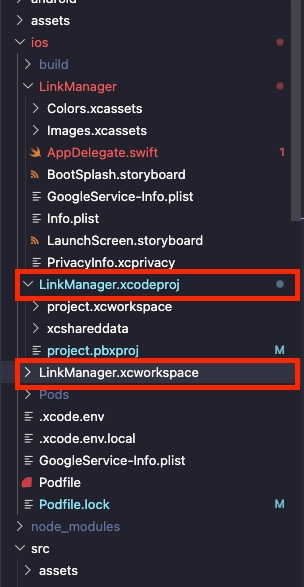
- ios 폴더 내에 LinkManager.xcodeproj와 linkManager.xcworkspace 로 대문자, 소문자가 섞여서 찾지 못해서 발생하는 문제였습니다. - 그리고 macOS 파일시스템이 기본적으로 case-insensitive(대소문자 구분 안 함)을 수행하기에 발생을 합니다. - 해당 과정은 대부분 react-native-rename 라이브러리를 사용하여서 두번 이상 변경을 하는 경우 발생을 하였습니다.
💡 macOS 파일시스템이 기본적으로 case-insensitive(대소문자 구분 안 함) 문제가 있습니다
- 그렇기에 macOS의 입장에서는 linkManager와 LinkManager를 동일하게 여기기에 중간에 temp를 둬서 변경을 합니다.
# 임시 이름 거쳐서 변경
$ mv linkManager.xcodeproj temp_LinkManager.xcodeproj
$ mv temp_LinkManager.xcodeproj LinkManager.xcodeproj

$ mv linkManager.xcworkspace temp_LinkManager.xcworkspace
$ mv temp_LinkManager.xcworkspace LinkManager.xcworkspace
2. contents.xcworkspacedata
💡 contents.xcworkspacedata
- 참조하고 있는 소문자를 대문자로 변경합니다.
<?xml version="1.0" encoding="UTF-8"?>
<Workspace
   version = "1.0">
   <FileRef
      location = "group:LinkManager.xcodeproj">
   </FileRef>
   <FileRef
      location = "group:Pods/Pods.xcodeproj">
   </FileRef>
   <FileRef
		   // 해당 부분 대문자로 변경
      location = "group:linkManager.xcodeproj">
   </FileRef>
</Workspace>
3. pod 재설치
💡 pod 재설치
- 프로젝트에 대해서 캐시를 모두 정리하고 pod을 재설치를 합니다.
# 1. 프로젝트 ios 폴더 접근
$ cd ios

# 2. CocoaPods 캐시
$ rm -rf Pods Podfile.lock

# 3. CocoaPods 시스템 캐시 정리
$ rm -rf ~/Library/Caches/CocoaPods

# 4. CocoaPods 완전 초기화
$ pod deintegrate
pod install
4. XCode 프로젝트에서 스킴(Scheme) 이름을 변경작업
💡 XCode 프로젝트에서 스킴(Scheme) 이름을 변경작업
- 위에 작업이 실패한 경우 아래와 같이 수행을 합니다. 1. sed -i '' 's/linkManager/LinkManager/g' ...xcscheme .xcscheme 파일 내부 텍스트에서 linkManager → LinkManager로 치환
2. mv linkManager.xcscheme LinkManager.xcscheme - 파일명 자체를 소문자 → 대문자로 변경
3. ls ...xcschemes/ - 변경 결과를 확인합니다.
# 파일 내부 텍스트에서 linkManager → LinkManager로 치환 작업
$ sed -i '' 's/linkManager/LinkManager/g' LinkManager.xcodeproj/xcshareddata/xcschemes/linkManager.xcscheme

# 파일명 자체를 소문자에서 대문자로 변경
$ mv LinkManager.xcodeproj/xcshareddata/xcschemes/linkManager.xcscheme LinkManager.xcodeproj/xcshareddata/xcschemes/LinkManager.xcscheme

# 변경 결과 상태를 확인.
$ ls LinkManager.xcodeproj/xcshareddata/xcschemes/