
해당 글에서는 Quill Editor를 이해하고 활용하는 방법에 대해서 알아봅니다.

1) Quill
💡 Quill
- 웹 기반의 리치 텍스트 에디터를 무료로 사용할 수 있는 오픈 소스 에디터입니다. 단순한 HTML의 textarea가 아닌 문서 구조를 데이터로 관리하는 특징을 가진 에디터입니다.
- 이러한 문서 구조의 데이터는 HTML 문자열이 아닌 Quill 자체의 ‘Delta 데이터 타입(JSON)’을 통해서 데이터가 전달되고 관리가 됩니다.
- BSD 3-clause 라이선스로 상업 서비스·유료 제품·폐쇄 소스 프로젝트에서도 사용 가능합니다
Quill - Your powerful rich text editor
Built for Developers Granular access to the editor's content, changes and events through a simple API. Works consistently and deterministically with JSON as both input and output.
quilljs.com
1. Quill Delta
💡 Quill Delta
- Delta는 Quill이 문서를 표현하는 표준 변경 포맷(JSON)을 의미합니다.
- HTML의 모호함과 복잡성 없이 모든 텍스트 및 서식 정보를 포함하는 모든 서식 있는 텍스트 문서를 설명할 수 있습니다.
| 속성 | 설명 | 사용예시 |
| insert | 현재 문서에 무언가를 추가하는 지에 대해 기록하는 방식 | { "insert": "제목", "attributes": { "header": 1 } } |
| delete | 현재 문서를 기준으로 앞쪽의 내용을 제거하는 방식 | { "delete": 5 } |
| retain | 기존 콘텐츠를 유지하면서, 위치를 건너뛰거나 스타일을 변경하는 방식 | { "retain": 3, "attributes": { "bold": true } |
💡 아래와 같은 데이터 구조로 저장되고 관리할 수 있습니다.
- 기존 html을 문자열로 저장하는 것보다 구조가 명확하다는 장점을 가지고 있습니다.
💡 HTML 문자열 구조의 데이터 타입 형태
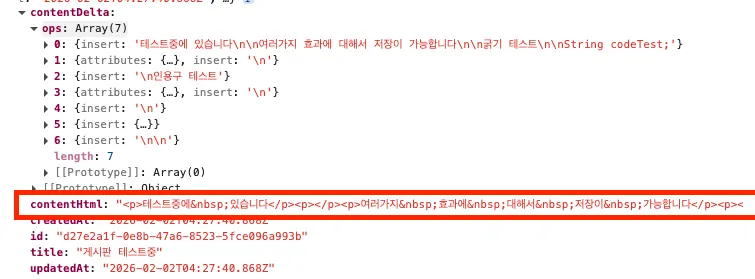
💡 Quill의 ‘Delta’ 데이터 타입 형태

💡 Quill Delta 구조
[
    {
        "insert": "테스트중에 있습니다\\n\\n여러가지 효과에 대해서 저장이 가능합니다\\n\\n굵기 테스트\\n\\nString codeTest;"
    },
    {
        "attributes": {
            "code-block": "plain"
        },
        "insert": "\\n"
    },
    {
        "insert": "\\n인용구 테스트"
    },
    {
        "attributes": {
            "blockquote": true
        },
        "insert": "\\n"
    },
    {
        "insert": "\\n"
    },
    {
        "insert": {
            "video": "<https://www.youtube.com/embed/eNL_fWxWh0w?showinfo=0>"
        }
    },
    {
        "insert": "\\n\\n"
    }
]
2) 설치
1. react-quill
💡 react-quill
- Quill을 이용하는데 React 16 미만 버전에 대해서 지원하는 구 버전입니다.
- 현재는 운영유지보수가 되지 않고 있습니다.
$ npm i react-quill

# or

$ yarn add npm i react-quill
2. react-quill-new (React Quill v2)
💡 react-quill-new
- Quill을 이용하는데 React 16+ 및 Typescript를 지원하는 버전입니다.
$ npm i react-quill

# or

$ yarn add npm i react-quill
GitHub - VaguelySerious/react-quill: A Quill component for React.
A Quill component for React. Contribute to VaguelySerious/react-quill development by creating an account on GitHub.
github.com
3. Quill 생태계 주요 라이브러리들
| 추가 라이브러리 | 설명 |
| quill-delta | Delta 자료구조 전용 라이브러리를 의미합니다. HTML 구조가 아닌 Quill만의 Delta(JSON) 구조를 통해 데이터를 저장하고 관리합니다. |
| @mgreminger/quill-image-resize-module | 에디터에서 이미지 크기 조절 필요할 때 사용하는 라이브러리를 의미합니다. 이를 통해 이미지의 사이즈 조정이 가능합니다. |
| quill-delta-to-html | Delta 자료구조를 HTML로 변환해주는 라이브러리를 의미합니다. 이를 통해 Viewer, SSR, 미리보기와 같은 기능에 이용이 됩니다. |
| quill-better-table | Quill Editor 내에서 테이블을 추가할 수 있는 라이브러리를 의미합니다. |
| quill-mention | Quill 내에서 @멘션 및 자동완성 기능의 라이브러리를 의미합니다. |
$ yarn add quill-delta

$ yarn add quill-image-resize-module quill-resize-module
3) 사용 방법
1. 환경
| 추가 라이브러리 | 설명 |
| react-quill-new | 3.7.0 |
| idb | 8.0.3 |
| quill-delta | 5.1.0 |
| @mgreminger/quill-image-resize-module | 1.0.5 |
2. Quill 등록 예시
💡 Quill 등록 예시
- 아래와 같은 Quill Editor를 이용한 Delta 데이터로 index DB에 저장하는 예시입니다.
- import 'react-quill-new/dist/quill.snow.css': ‘snow 테마’를 선택하였습니다.
- format: 에디터에서 허용할 서식(format) 목록을 명시적으로 제한합니다. 즉, 에디터에서 사용할 서식을 지정합니다.
- toolbarOptions: 상단에 툴바에 나오는 옵션들을 지정합니다.
- modules : Quill의 플러그인·기능·동작 방식 설정 집합을 의미합니다.
💡 이러한 옵션들을 통해 ReactQuill 태그 내에서 사용될 옵션들을 지정합니다.
import React, { useEffect, useState } from 'react';
import ReactQuill, { Quill } from 'react-quill-new';
import ImageResize from "@mgreminger/quill-image-resize-module";
import 'react-quill-new/dist/quill.snow.css';

import { v4 as uuidv4 } from 'uuid';

Quill.register('modules/imageResize', ImageResize);

import Delta from 'quill-delta';
import { dbPromise } from '../../server/dbPromise';
import { useNavigate } from 'react-router-dom';

export default function QuillEditorPage() {
    const navigate = useNavigate();
    const [title, setTitle] = useState('');
    const [contentHtml, setContentHtml] = useState('');
    const [contentDelta, setContentDelta] = useState<Delta | null>(null);

    const formats = [
        'header',
        'bold', 'italic', 'underline', 'strike',
        'blockquote', 'code-block',
        'list', 'bullet', 'check',
        'indent',
        'link',
        'image',
        'video',
        'color', 'background',
        'align',
        'font',
        'size',
    ];

    const toolbarOptions = [
        ['bold', 'italic', 'underline', 'strike'],
        ['blockquote', 'code-block'],
        ['link', 'image', 'video', 'formula'],
        [{ header: 1 }, { header: 2 }],
        [{ list: 'ordered' }, { list: 'bullet' }, { list: 'check' }],
        [{ script: 'sub' }, { script: 'super' }],
        [{ indent: '-1' }, { indent: '+1' }],
        [{ direction: 'rtl' }],
        [{ size: ['small', false, 'large', 'huge'] }],
        [{ header: [1, 2, 3, 4, 5, 6, false] }],
        [{ color: [] }, { background: [] }],
        [{ font: [] }],
        [{ align: [] }],
        ['clean'],
    ];

    const modules = {
        toolbar: toolbarOptions,
        imageResize: {
            modules: ['Resize', 'DisplaySize', 'Toolbar'],
        },
    };

    const checkPosts = async () => {
        const db = await dbPromise;
        const allPosts = await db.getAll('posts');
        console.log(allPosts);
    };
    useEffect(() => {
        checkPosts();
    }, [])

    const handleSave = async () => {
        if (!title.trim()) {
            alert('제목을 입력해 주세요.');
            return;
        }

        if (!contentDelta || !contentDelta.ops?.length) {
            alert('내용을 입력해 주세요.');
            return;
        }

        await savePostToDB({
            title,
            contentDelta,
            contentHtml,
        });

        alert('로컬에 저장되었습니다.');
        navigate('/editor/quill/list');

    };

    const savePostToDB = async ({
        title,
        contentDelta,
        contentHtml,
    }: {
        title: string;
        contentDelta: Delta;
        contentHtml: string;
    }) => {
        const db = await dbPromise;

        const now = new Date().toISOString();

        const id = uuidv4();
        await db.put("posts", {
            id,
            title,
            contentDelta,
            contentHtml,
            createdAt: now,
            updatedAt: now,
        });
    };

    return (
        <div style={styles.page}>
            <div style={styles.container}>
                <div style={styles.header}>
                    <h1 style={styles.title}>게시글 작성</h1>
                    <p style={styles.subtitle}>
                        내용을 자유롭게 작성해 주세요.
                    </p>
                </div>

                <input
                    style={styles.titleInput}
                    placeholder="제목을 입력하세요"
                    value={title}
                    onChange={(e) => setTitle(e.target.value)}
                />

                <div style={styles.editorWrapper}>
                    <ReactQuill
                        theme="snow"
                        value={contentHtml}
                        onChange={(html, delta, source, editor) => {
                            setContentHtml(html);
                            setContentDelta(editor.getContents());
                        }}
                        modules={modules}
                        formats={formats}
                        style={styles.editor}
                        placeholder="내용을 입력하세요..."
                    />
                </div>
                <div style={styles.footer}>
                    <button
                        style={styles.backButton}
                        onClick={() => window.history.back()}
                    >
                        ← 뒤로가기
                    </button>

                    <button
                        style={styles.saveButton}
                        onClick={handleSave}
                    >
                        💾 저장
                    </button>
                </div>
                <div style={styles.footerNote}>
                    Editor powered by react-quill-new v3.7.0
                </div>
            </div>

        </div>
    );
}

/* ===================== 스타일 ===================== */
const styles: Record<string, React.CSSProperties> = {
    page: {
        minHeight: '100vh',
        background: '#f5f6f8',
        padding: '40px 0',
    },
    container: {
        maxWidth: 960,
        margin: '0 auto',
        background: '#fff',
        padding: '32px 36px',
        borderRadius: 16,
        boxShadow: '0 12px 30px rgba(0,0,0,0.08)',
    },
    header: {
        marginBottom: 28,
    },
    title: {
        margin: 0,
        fontSize: 28,
        fontWeight: 700,
        color: '#111',
    },
    subtitle: {
        marginTop: 8,
        color: '#666',
        fontSize: 14,
    },
    titleInput: {
        width: '100%',
        padding: '14px 16px',
        fontSize: 18,
        borderRadius: 8,
        border: '1px solid #ddd',
        marginBottom: 20,
        outline: 'none',
    },
    editorWrapper: {
        borderRadius: 12,
        overflow: 'hidden',
        border: '1px solid #e5e7eb',
    },
    editor: {
        minHeight: 400, // ⭐ 높이 증가
        fontSize: 16,
    },
    footer: {
        marginTop: 32,
        display: 'flex',
        justifyContent: 'center',
        gap: 12,
    },

    backButton: {
        padding: '12px 20px',
        fontSize: 14,
        fontWeight: 600,
        borderRadius: 8,
        border: '1px solid #d1d5db',
        background: '#fff',
        color: '#374151',
        cursor: 'pointer',
        transition: 'all 0.2s ease',
    },
    footerNote: {
        marginTop: 12,
        fontSize: 12,
        color: '#888',
        textAlign: 'right',
    },
    saveButton: {
        padding: '12px 24px',
        fontSize: 14,
        fontWeight: 700,
        borderRadius: 8,
        border: 'none',
        background: '#2563eb', // 블루
        color: '#fff',
        cursor: 'pointer',
        transition: 'all 0.2s ease',
    },
};
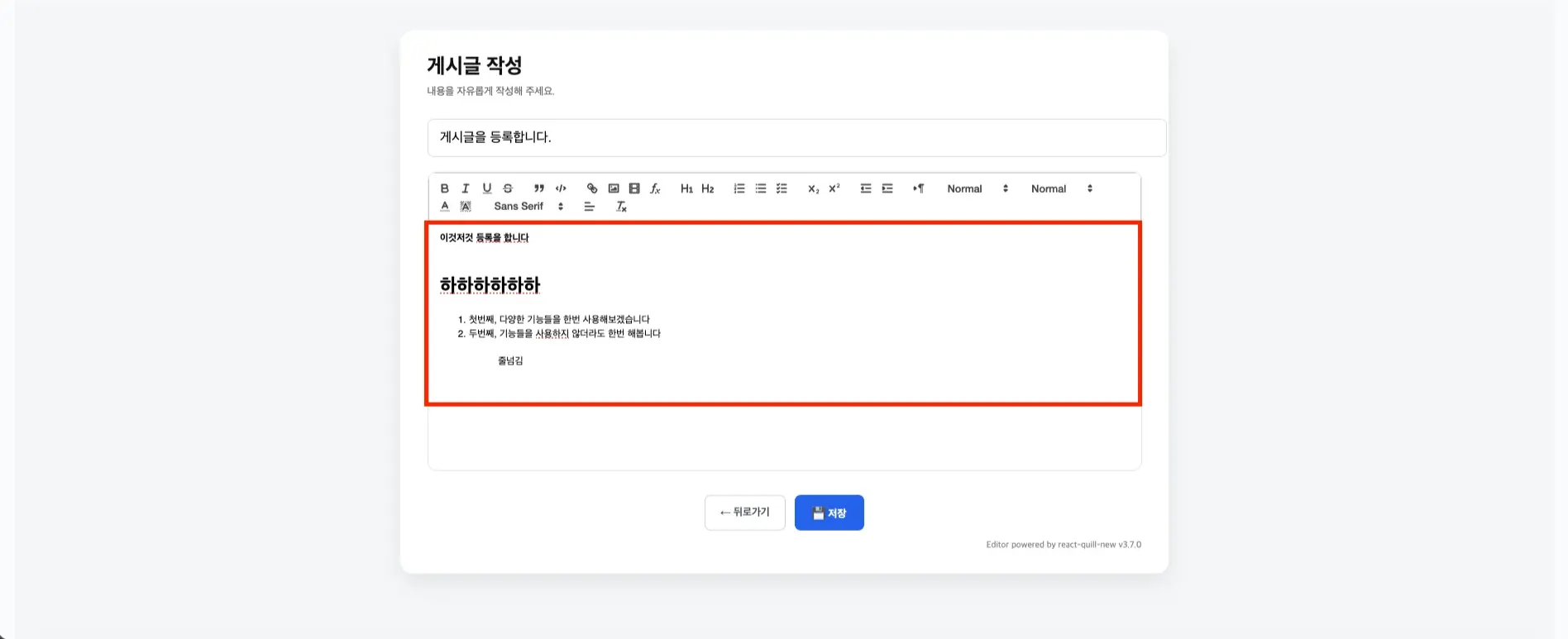
💡 아래와 같이 지정한 툴바들이 사용이 됩니다.

💡 아래와 같이 툴바를 이용하고 등록을 합니다.
💡 [참고] 다양한 옵션은 아래의 링크에서 확인이 가능합니다.
Quill - Your powerful rich text editor
Built for Developers Granular access to the editor's content, changes and events through a simple API. Works consistently and deterministically with JSON as both input and output.
quilljs.com
3. Quill 상세 조회 예시
💡 Quill 상세 조회 예시
- 위에서 IndexDB내에 임시로 저장한 데이터들에 대해서 상세 화면으로 출력을 합니다.
- 위와 다르게 테마를 bubble을 이용하여서 화면상에 출력을 합니다.
- 저장된 id 값을 기반으로 저장된 Delta 구조를 기반으로 ReactQuill 태그 내에 데이터를 출력하며, 화면상에 출력을 합니다.
💡 Quill의 bubble 테마를 이용하여서 에디터 내용을 상세화면으로 출력합니다.
import { useEffect, useState } from "react";
import { useNavigate, useParams } from "react-router-dom";
import ReactQuill from "react-quill-new";
import "react-quill-new/dist/quill.bubble.css";

import { getPostById } from "../../server/dbPromise";

interface Post {
    id: string;
    title: string;
    contentDelta: any;
    contentHtml: string;
    createdAt: string;
    updatedAt: string;
}
function formatDate(iso: string) {
    return new Date(iso).toISOString().slice(0, 10);
}
export default function QuillPostDetailPage() {
    const { id } = useParams<{ id: string }>();
    const navigate = useNavigate();

    const [post, setPost] = useState<Post | null>(null);

    useEffect(() => {
        if (!id) return;

        (async () => {
            const data = await getPostById(id);
            setPost(data ?? null);
            console.log("data : ", data)
        })();

    }, [id]);

    if (!post) {
        return <div style={styles.loading}>게시글을 불러오는 중입니다…</div>;
    }

    return (
        <div style={styles.page}>
            {/* ===== 상단 액션 ===== */}
            <div style={styles.topBar}>
                <button
                    style={styles.backButton}
                    onClick={() => navigate(-1)}
                >
                    ← 목록
                </button>
            </div>

            {/* ===== 제목 영역 ===== */}
            <h1 style={styles.title}>{post.title}</h1>
            <div style={styles.date}>
                {formatDate(post.createdAt)}
            </div>

            <hr style={styles.divider} />

            {/* ===== Quill Viewer ===== */}
            <ReactQuill
                value={post.contentDelta}
                readOnly
                theme="bubble"
            />
        </div>
    );
}

const styles: Record<string, React.CSSProperties> = {
    page: {
        maxWidth: 800,
        margin: "40px auto",
        padding: 24,
        background: "#ffffff",
        borderRadius: 12,
        boxShadow: "0 8px 24px rgba(0,0,0,0.06)",
    },
    topBar: {
        marginBottom: 16,
    },
    backButton: {
        border: "none",
        background: "transparent",
        cursor: "pointer",
        fontSize: 14,
        color: "#6b7280",
    },
    title: {
        fontSize: 28,
        fontWeight: 700,
        marginBottom: 8,
    },
    date: {
        fontSize: 13,
        color: "#9ca3af",
        marginBottom: 20,
    },
    divider: {
        border: "none",
        borderTop: "1px solid #e5e7eb",
        marginBottom: 20,
    },
    loading: {
        textAlign: "center",
        padding: 40,
        color: "#9ca3af",
    },
};
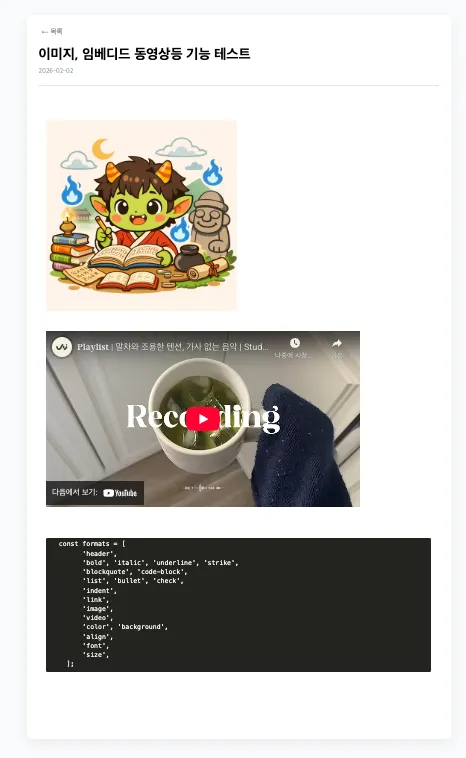
💡 아래와 같이 위에서 저장한 내용이 아래와 같이 보입니다.

💡 추가로 툴바로 저장한 이미지, youtube 영상, 코드스니핏등 다양하게 화면상에 출력이 가능합니다.
4) Quill과 XSS(Cross-Site Scripting) 방지
💡 Quill과 XSS(Cross-Site Scripting) 방지
- HTML 전송의 경우는 XSS 공격에 취약합니다. HTML 코드를 중간에 탈취하고 변경하여서 데이터베이스에 저장하여 이를 통해 공격을 합니다.
- Quill의 경우는 HTML 형태로 전송되지 않고, Quill만의 ‘Delta’라는 JSON 구조로 데이터를 전송하기에 Delta 자체로는 XSS를 만들 수 없습니다.
💡 [참고] XSS(Cross-Site Scripting)
- 공격자가 취약한 웹사이트에 악성 스크립트를 삽입하여, 이를 방문하는 사용자의 브라우저에서 스크립트를 실행시키는 클라이언트 측 공격입니다.
- 세션 쿠키 탈취, 데이터 도난, 웹사이트 변조, 피싱 사이트 리다이렉션 등의 피해를 유발합니다.
- 주요 원인은 입력값 검증 미흡이며, 저장형, 반사형, DOM 기반 XSS로 나뉩니다.
💡 아래와 같이 Markup을 포함하여 저장하고 있지 않습니다.
{
    "insert": "HTML 자체를 저장하는게 아니라\\n\\nDelta라는 데이터 구조로 저장하기에 이를 조합하여 전달할 수 없습니다.\\n"
}
💡 HTML 구조의 경우는 아래와 같은 형태로 저장되고 있습니다.
<p>HTML 자체를 저장하는게 아니라</p><p></p><p>Delta라는 데이터 구조로 저장하기에 이를 조합하여 전달할 수 없습니다.</p>
오늘도 감사합니다. 😀
'React & React Native > 라이브러리 활용' 카테고리의 다른 글
이 포스팅은 쿠팡 파트너스 활동의 일환으로, 이에 따른 일정액의 수수료를 제공받습니다.